- Published on
Traefik as Local Reverse Proxy for Docker Services
- Authors

- Name
- Vinayak Ganapuram
- @vinayakkg
I have been running multiple Docker services on my local machine for a while now - LLM gateways, PDF tools, web interfaces, and more. The problem? Remembering which service runs on which port. Is LiteLLM on 4000 or 8080? Is Open WebUI on 3000 or 8080? After a few weeks of docker ps and browser bookmark gymnastics, I decided to fix this once and for all.
Enter Traefik - a modern reverse proxy that auto-discovers Docker containers and routes traffic based on simple labels. Now I access my services with memorable URLs like litellm.localhost, gptall.localhost, pdftool.localhost and llm-council.localhost. No more port numbers to remember.
Why Traefik?
There are several reverse proxy options out there - nginx, HAProxy, Caddy - but Traefik has some unique advantages for local development:
- Auto-discovery: Traefik watches the Docker socket and automatically picks up new containers with the right labels. No config file edits needed when adding services.
- Zero-downtime: Services can be added or removed without restarting the proxy.
- Built-in dashboard: A web UI to see all your routes and services out of the box.
- Simple configuration: Labels on your containers define the routing. No separate config files per service.
- Dynamic configuration: For services running outside Docker (like on host machine), you can add them via simple YAML files that are watched for changes.
The Setup
Prerequisites
You need Docker and Docker Compose installed. The .localhost TLD is special - it always resolves to 127.0.0.1 without any /etc/hosts modification needed on most systems.
Directory Structure
I keep all my Docker volumes on an external drive for portability:
/Volumes/lcldata/docker-volumes/
├── traefik/
│   └── dynamic.yaml
├── litellm/
│   └── config.yaml
├── open-webui/
└── stirling-pdf/
The Docker Compose File
Here is the complete docker-compose.yml that sets up Traefik along with some useful services:
services:
  # Traefik Reverse Proxy - http://traefik.localhost
  traefik:
    image: traefik:v3.3
    container_name: traefik
    command:
      - "--api.insecure=true"
      - "--providers.docker=true"
      - "--providers.docker.exposedbydefault=false"
      - "--entrypoints.web.address=:80"
      - "--providers.file.directory=/etc/traefik/dynamic"
      - "--providers.file.watch=true"
    ports:
      - "80:80"
    volumes:
      - /var/run/docker.sock:/var/run/docker.sock:ro
      - /Volumes/lcldata/docker-volumes/traefik:/etc/traefik/dynamic:ro
    extra_hosts:
      - "host.docker.internal:host-gateway"
    labels:
      - "traefik.enable=true"
      - "traefik.http.routers.dashboard.rule=Host(`traefik.localhost`)"
      - "traefik.http.routers.dashboard.entrypoints=web"
      - "traefik.http.routers.dashboard.service=api@internal"
    restart: unless-stopped
    networks:
      - web
    logging:
      driver: json-file
      options:
        max-size: "10m"
        max-file: "3"

networks:
  web:
    driver: bridge
Let me break down the important parts:
Traefik Command Options
--api.insecure=true: Enables the dashboard without authentication (fine for local use)--providers.docker=true: Watch Docker for containers--providers.docker.exposedbydefault=false: Only expose containers withtraefik.enable=truelabel--entrypoints.web.address=:80: Listen on port 80--providers.file.directory=/etc/traefik/dynamic: Watch this directory for dynamic config files--providers.file.watch=true: Hot-reload when files change
Key Volumes
/var/run/docker.sock: Allows Traefik to watch Docker events/etc/traefik/dynamic: For dynamic configuration files (services running outside Docker)
The Labels Magic
The labels section is where the routing magic happens:
labels:
  - "traefik.enable=true"
  - "traefik.http.routers.dashboard.rule=Host(`traefik.localhost`)"
  - "traefik.http.routers.dashboard.entrypoints=web"
  - "traefik.http.routers.dashboard.service=api@internal"
Important: The Host() syntax uses backticks, not regular quotes. This is a common source of errors. I spent time debugging why my routes were not working only to discover a missing opening parenthesis in Host().
Adding Docker Services
Once Traefik is running, adding new services is straightforward. Just add the right labels to your container. Here are some services I run:
LiteLLM - Unified LLM Gateway
LiteLLM provides a unified API for multiple LLM providers. Access all your AI models through one endpoint.
litellm:
  image: ghcr.io/berriai/litellm:main-stable
  container_name: litellm
  volumes:
    - /Volumes/lcldata/docker-volumes/litellm:/app/litellm-config
  environment:
    - LITELLM_MASTER_KEY=${LITELLM_MASTER_KEY:-sk-litellm-master-key}
    - LITELLM_SALT_KEY=${LITELLM_SALT_KEY:-sk-litellm-salt-key}
    - OPENAI_API_KEY=${OPENAI_API_KEY:-}
    - ANTHROPIC_API_KEY=${ANTHROPIC_API_KEY:-}
    - GEMINI_API_KEY=${GEMINI_API_KEY:-}
  command:
    - "--config"
    - "/app/litellm-config/config.yaml"
    - "--port"
    - "4000"
  extra_hosts:
    - "host.docker.internal:host-gateway"
  labels:
    - "traefik.enable=true"
    - "traefik.http.routers.litellm.rule=Host(`litellm.localhost`)"
    - "traefik.http.routers.litellm.entrypoints=web"
    - "traefik.http.services.litellm.loadbalancer.server.port=4000"
  restart: unless-stopped
  networks:
    - web
What it solves: Instead of managing multiple API keys and endpoints in each application, configure them once in LiteLLM and use a single endpoint everywhere.
Open WebUI - Chat Interface
Open WebUI provides a ChatGPT-like interface for local and remote LLMs.
open-webui:
  image: ghcr.io/open-webui/open-webui:main
  container_name: open-webui
  volumes:
    - /Volumes/lcldata/docker-volumes/open-webui:/app/backend/data
  environment:
    - OLLAMA_BASE_URL=http://host.docker.internal:11434
    - WEBUI_SECRET_KEY=${WEBUI_SECRET_KEY:-changeme}
    - WEBUI_NAME=GPT All
  extra_hosts:
    - "host.docker.internal:host-gateway"
  labels:
    - "traefik.enable=true"
    - "traefik.http.routers.openwebui.rule=Host(`gptall.localhost`)"
    - "traefik.http.routers.openwebui.entrypoints=web"
    - "traefik.http.services.openwebui.loadbalancer.server.port=8080"
  restart: unless-stopped
  networks:
    - web
What it solves: A beautiful web interface to chat with Ollama models running locally or any OpenAI-compatible API. Supports multiple users, chat history, and model switching.
Stirling PDF - PDF Swiss Army Knife
Stirling PDF is a self-hosted PDF manipulation tool.
stirling-pdf:
  image: stirlingtools/stirling-pdf:latest
  container_name: stirling-pdf
  volumes:
    - /Volumes/lcldata/docker-volumes/stirling-pdf/training-data:/usr/share/tessdata
    - /Volumes/lcldata/docker-volumes/stirling-pdf/configs:/configs
  environment:
    - DOCKER_ENABLE_SECURITY=false
    - INSTALL_BOOK_AND_ADVANCED_HTML_OPS=false
    - LANGS=en_GB
  labels:
    - "traefik.enable=true"
    - "traefik.http.routers.stirlingpdf.rule=Host(`pdftool.localhost`)"
    - "traefik.http.routers.stirlingpdf.entrypoints=web"
    - "traefik.http.services.stirlingpdf.loadbalancer.server.port=8080"
  restart: unless-stopped
  networks:
    - web
What it solves: Merge, split, rotate, convert PDFs - all locally without uploading to sketchy online tools. Your documents stay on your machine.
LLM Council - Multi-LLM Consensus
LLM Council by Andrej Karpathy is a clever tool that queries multiple LLMs simultaneously, has them review and rank each other's responses, and then a "Chairman" LLM produces the final consolidated answer.
Since LLM Council runs directly on your host machine (not in Docker), we use dynamic configuration:
# /Volumes/lcldata/docker-volumes/traefik/dynamic.yaml
http:
  routers:
    llm-council:
      rule: "Host(`llm-council.localhost`)"
      entryPoints:
        - web
      service: llm-council-service
    llm-council-api:
      #rule: "Host(`llm-council.localhost`) && PathPrefix(`/api`)"
      rule: "Host(`llm-council-api.localhost`)"
      entryPoints:
        - web
      service: llm-council-api-service
  services:
    llm-council-service:
      loadBalancer:
        servers:
          - url: "http://host.docker.internal:5173"
    llm-council-api-service:
      loadBalancer:
        servers:
          - url: "http://host.docker.internal:8001"
This routes llm-council.localhost to a Vite dev server running on port 5173 & flask api running on port 8001 on your host machine.
What it solves: Instead of trusting a single LLM's response, get consensus from multiple models. The LLMs anonymously review each other's work and the best insights are compiled into the final answer. Great for complex questions where you want multiple perspectives.
Dynamic Configuration for Non-Docker Services
Sometimes you have services running directly on your host machine (not in Docker). Traefik handles this through dynamic configuration files. We already saw this with LLM Council above.
Setting Up Dynamic Config
Create a YAML file in your Traefik dynamic config directory. The LLM Council example shows the pattern - define a router with a Host() rule and a service with the target URL using host.docker.internal to reach the host machine from within Docker.
Adding More Host Services
To add another host service, just append to the same file or create a new YAML file in the same directory:
http:
  routers:
    my-app:
      rule: "Host(`myapp.localhost`)"
      entryPoints:
        - web
      service: my-app-service
    another-app:
      rule: "Host(`another.localhost`)"
      entryPoints:
        - web
      service: another-app-service
  services:
    my-app-service:
      loadBalancer:
        servers:
          - url: "http://host.docker.internal:3000"
    another-app-service:
      loadBalancer:
        servers:
          - url: "http://host.docker.internal:8000"
Since we enabled --providers.file.watch=true, Traefik picks up changes automatically. No restart needed.
The Traefik Dashboard
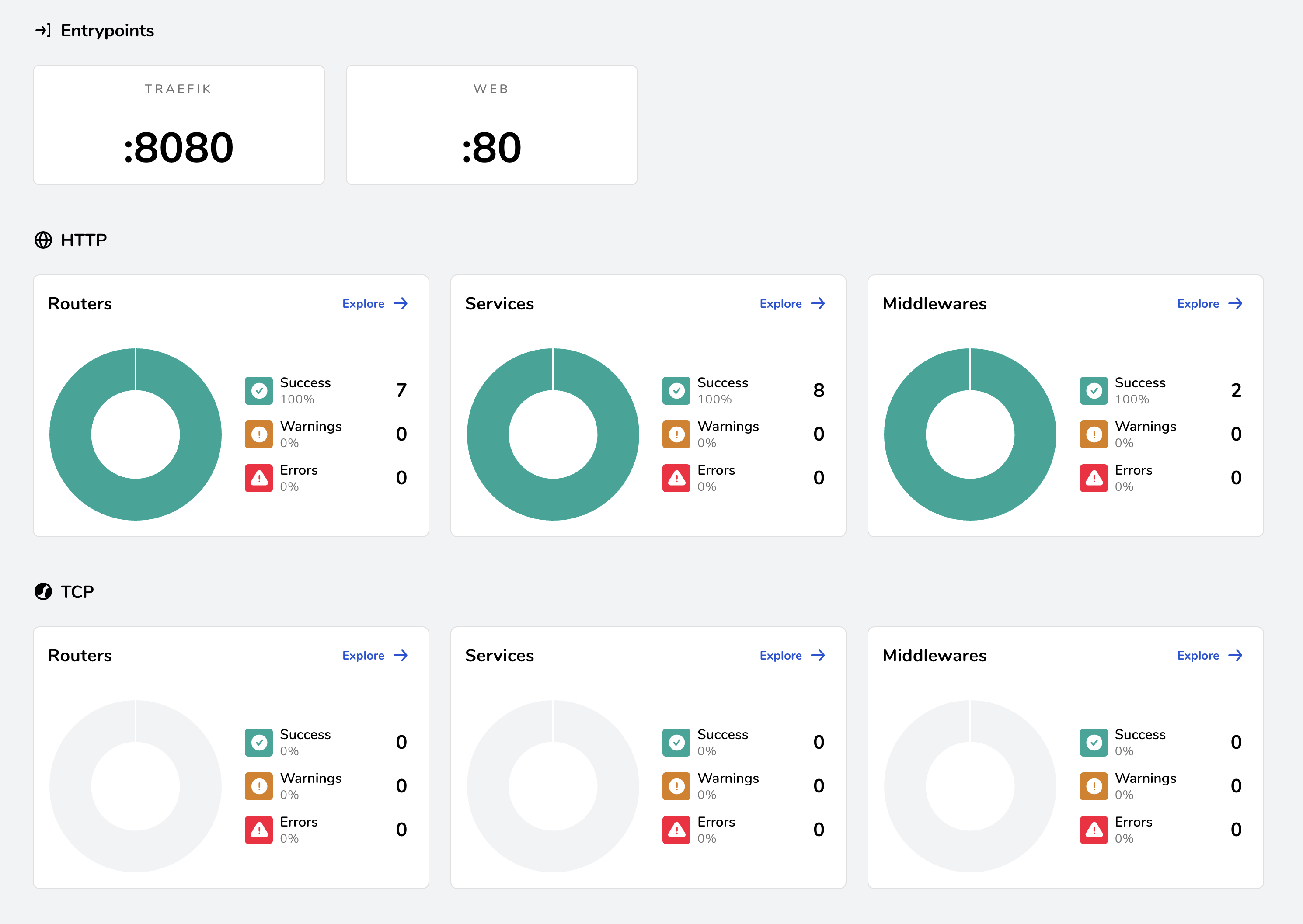
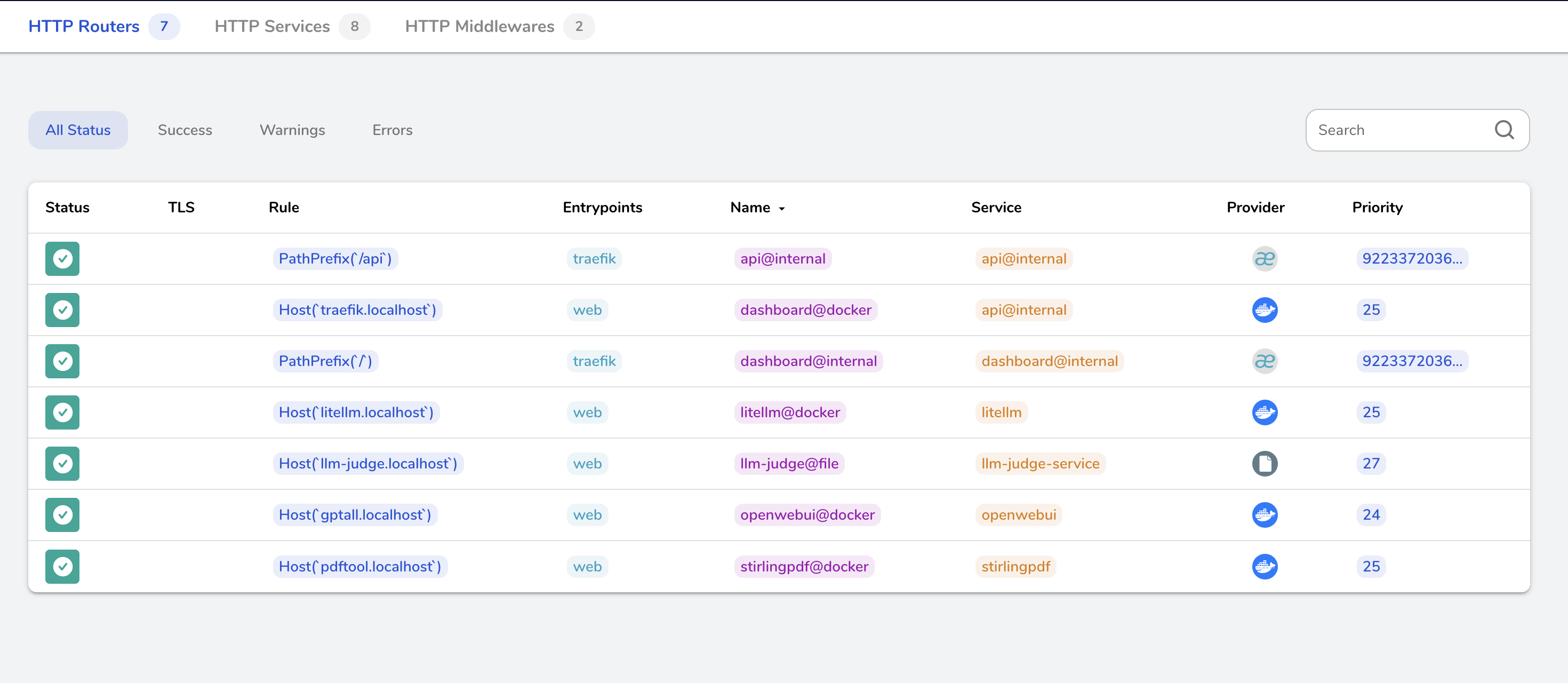
One of Traefik's best features is its built-in dashboard. Once running, visit http://traefik.localhost to see:
- All configured routers and their rules
- All services and their health status
- Entrypoints and middlewares
- Real-time updates as containers start/stop
The dashboard is invaluable for debugging routing issues. If a service is not accessible, check the dashboard first to see if Traefik has discovered it.
Quick Start Template
Here is a minimal template for adding any new Docker service:
my-service:
  image: some-image:tag
  container_name: my-service
  labels:
    - "traefik.enable=true"
    - "traefik.http.routers.myservice.rule=Host(`myservice.localhost`)"
    - "traefik.http.routers.myservice.entrypoints=web"
    - "traefik.http.services.myservice.loadbalancer.server.port=8080"
  networks:
    - web
Replace:
my-service/myservicewith your service name (keep consistent)some-image:tagwith your Docker imagemyservice.localhostwith your desired URL8080with the port your service listens on inside the container
Common Pitfalls
1. Host Rule Syntax
The Host() function requires backticks and parentheses:
# ❌ Wrong
- "traefik.http.routers.app.rule=Host`app.localhost`)"

# ✅ Correct
- "traefik.http.routers.app.rule=Host(`app.localhost`)"
2. Missing Network
All services need to be on the same Docker network as Traefik:
networks:
  - web
3. Port Configuration
The loadbalancer.server.port should be the internal container port, not a mapped host port:
# If your service listens on 8080 inside the container
- "traefik.http.services.myservice.loadbalancer.server.port=8080"
4. Forgetting to Enable
Without traefik.enable=true, Traefik ignores the container (since we set exposedbydefault=false):
- "traefik.enable=true" # Don't forget this!
5. Dynamic Config Not Loading
If your dynamic config is not being loaded:
- Check that you have
--providers.file.directoryand--providers.file.watch=truein your Traefik command - Verify the volume mount path matches
- Check the dashboard - it shows if file provider is active
Summary
With Traefik as your local reverse proxy:
- Access services via memorable URLs (
service.localhost) - Auto-discovery for Docker containers via labels
- Dynamic configuration for host services via YAML files
- Built-in dashboard for monitoring and debugging
- Hot-reload for configuration changes
The initial setup takes about 15 minutes, but the productivity gains are worth it. No more port number memorization, no more bookmark chaos.